

ComfyUI is a tool for generating images which can be deployed locally.
ComfyUI
Overview
ComfyUI is the most powerful and modular diffusion model GUI, API and backend with a graph/nodes interface. Now you can use it in Dify, input the prompt or images, and get the generated image.
It is highly recommended to install comfy-asset-downloader on your ComfyUI server as this plugin needs it to download models automatically.
Configuration
1. Ensure that the ComfyUI workflow is running normally
Please refer to its official documentation to ensure that ComfyUI can run normally and generate images.
2. Export the API file of the workflow
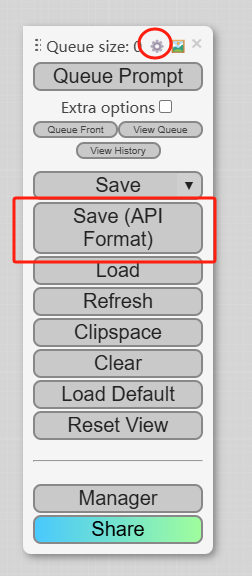
As shown in the figure, select . If there is no such selection, you need to enable in the settings.
3. Get ComfyUI tools from Plugin Marketplace
The ComfyUI tools could be found at the Plugin Marketplace, please install it first.
4. Integrate ComfyUI in Dify
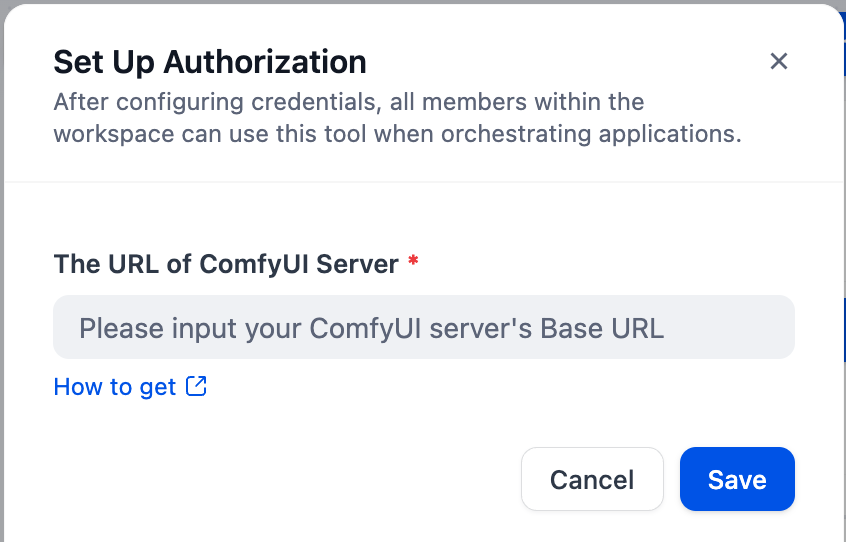
On the Dify navigation page, click and fill in the URL of ComfyUI Server.
5. Use ComfyUI in Dify
You can use the ComfyUI tool in the following application types:
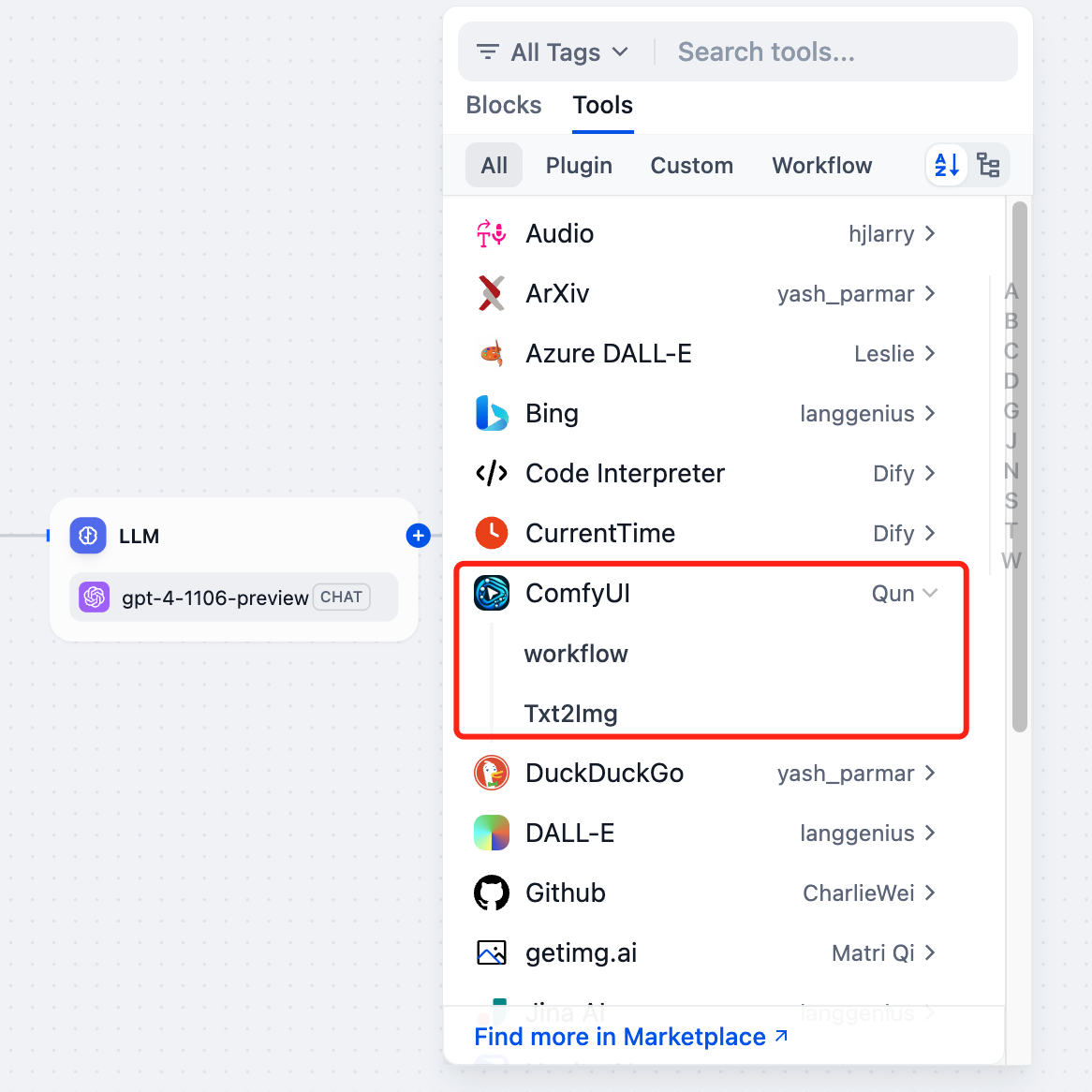
Chatflow / Workflow applications
Both Chatflow and Workflow applications support the tool node. After adding it, you need to fill in the "Input Variables → Prompt" in the node with variables to reference the user's input prompt or the content generated by the previous node. Finally, use the variable to reference the image output by in the "End" node.
Agent applications
Add the tool in the Agent application, then send a picture description in the dialog box to call the tool to generate an AI image.
Image input
Some ComfyUI workflows require multiple images inputs. In Dify, it will find every node in the and fill in the image files input by the user in order. When you want to change this order, you can adjust it by filling in the . For example, if your workflow needs to input images into the 35th, 69th, and 87th nodes, then input will pass the first image to the 69th node.
Nodes
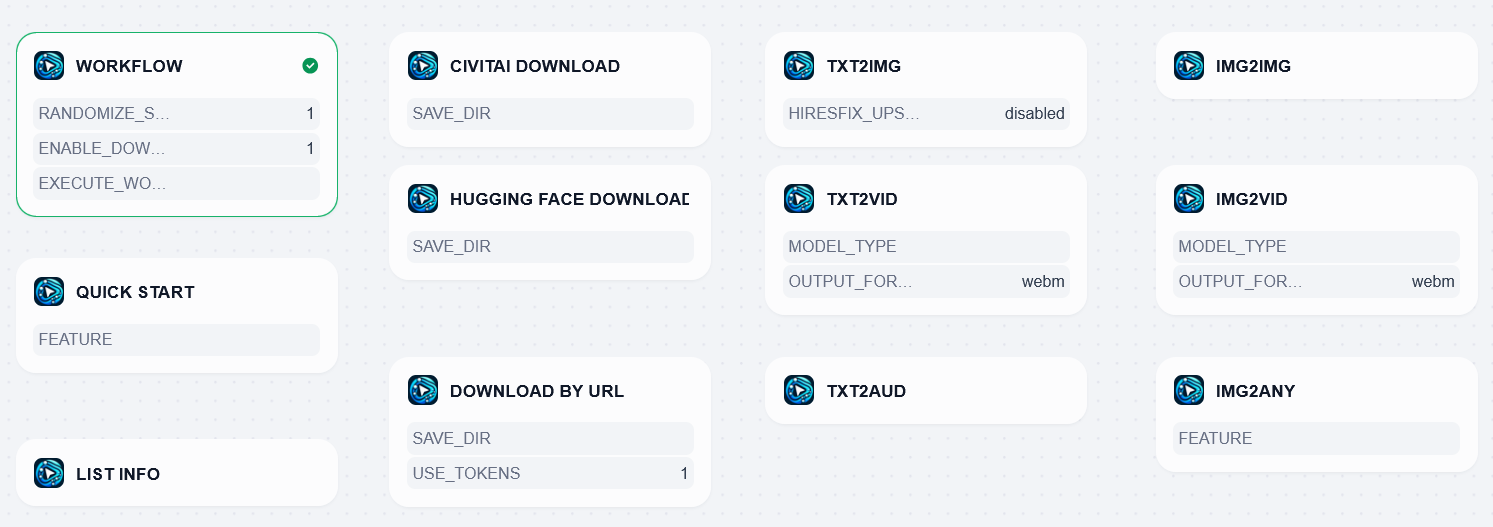
Workflow
Workflow node is a basic node for ComfyUI.
You can set any ComfyUI node settings by inputting JSON to this node.
Quick Start
Quick Start node supports some functions of ComfyUI including the following ones. Best for beginners.
- Qwen Image
- Qwen Image Edit
- Qwen Image Edit 2509
- Flux Dev fp8
- Flux Schnell fp8
- Pony Diffusion V6 XL: the most liked Pony-based model on CivitAI
- majicMIX realistic: the most liked SD1.5-based model on CivitAI
- WAI-NSFW-illustrious-SDXL: the most liked Illustrious-based model on CivitAI
List Info
List Models can fetch all the names of the models, sampling methods and schedulers available on the connected ComfyUI.
CivitAI Download
CivitAI Download node can download models from CivitAI.
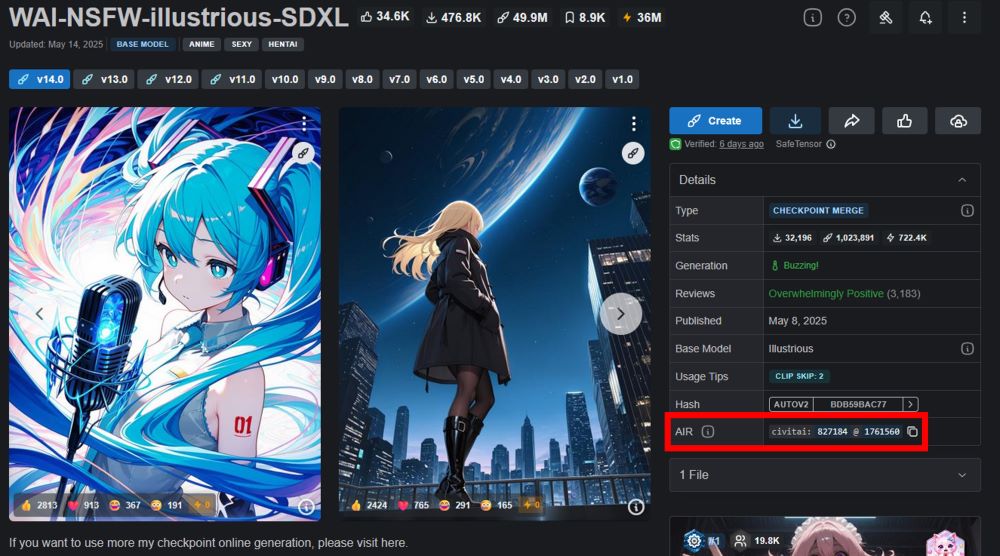
You need to input model ID and version ID to download a model.
These two IDs are shown as AIR(see the highlited area on the image below).
Hugging Face Download
Hugging Face Download node can download models from Hugging Face.
Download By URL
Download By URL node can download models from a given URL.
Txt2Img
Txt2Img node can generate an image from texts(prompt and negative prompt).
If you want to generate large images(typically 1600x1600 or bigger), HiresFix option is for you.
It generates a small and consistent image then upscale it.
Without HiresFix, large images tend to have unnaturally duplicated objects and artifacts.
Txt2Vid
Txt2Vid node can generate an video from texts(prompt and negative prompt).
Txt2Aud
Txt2Aud node can generate an audio from texts(prompt and negative prompt).
Img2Img
Img2Img node can edit an given image according to prompt and negative prompt.
Img2Vid
Img2Vid node can generate an video from an given image.
Img2Any
Img2Any node takes only images and edits them in a various way.
The following features are supported.
- Depth Anything: Performs monocular depth estimation.
- Depth Pro: Performs monocular depth estimation.
- Faceswap: Extracts a face on the first image and infuse it to the second image.
- Upscale ESRGAN x4: Enlarges an given image with models by 4 (512x512 -> 2048x2048).
Some features require addons for ComfyUI. You need to install them to ComfyUI in advance.
- Depth Anything: https://github.com/kijai/ComfyUI-DepthAnythingV2
- Depth Pro: https://github.com/spacepxl/ComfyUI-Depth-Pro
- Faceswap: https://github.com/Gourieff/ComfyUI-ReActor
- Upscale ESRGAN x4: No addons required
Prebuilt Docker Image
If you don't know how to host ComfyUI, a prebuilt docker image would help you.
It has ComfyUI itself and all the required packages for this plugin.
All you need to start a ComfyUI server is to type the following command on a server with docker and a GPU installed.
If you want to save large models to somewhere other than the system disk, say "/mnt/hdd/models", you can use -v option.
Specifically, the docker image contains the following packages.
- https://github.com/comfyanonymous/ComfyUI: ComfyUI
- https://github.com/ltdrdata/ComfyUI-Manager: Manager for ComfyUI. helps you to install ComfyUI addons.
- https://github.com/ServiceStack/comfy-asset-downloader.git: Asset downloader for ComfyUI
- https://github.com/kijai/ComfyUI-DepthAnythingV2.git: Addon for Depth Anything
- https://github.com/spacepxl/ComfyUI-Depth-Pro.git: Addon for Depth Pro
- https://github.com/Gourieff/ComfyUI-ReActor.git: Addon for Faceswap
- https://github.com/Kosinkadink/ComfyUI-VideoHelperSuite.git: Addon for converting WEBP to MP4
Key Changelogs
0.3.0 Sound Update
https://github.com/langgenius/dify-official-plugins/pull/1728
New features:
- Text-to-audio: it used to output only image or videos but now it can output audio files as well!
- Auto token selection for downloader: Download By URL node now automatically selects the most appropriate token to the given download URL.
Deletion:
- List Models node and List Samplers node are integrated into List Info node.
- Delete Image Info: Please use dify-pillow for an equivalent feature.
- Download By JSON node is integrated into Workflow node.
Fix:
- Fix CivitAI downloader which used to download non-model files(e.g. TrainingData.zip)
- Change Img2Any node's ID to img2any
Refactor:
- Refactor to pass all the checks by ruff.
0.2.0 Video&AutoDownloader Update
https://github.com/langgenius/dify-official-plugins/pull/1203
New feature:
- Img2vid node now supports Wan2.1, LTXV and SVD.
- New Txt2vid node generates a video from prompts. It also supports Wan2.1, LTXV, Mochi and Hunyuan.
- Auto Download feature: All generative nodes from txt2img to img2vid now download and use ComfyUI's default models if models are not specified.
- Support for generating MP4 video: As requested in here, txt2vid and img2vid can output .mp4 as well as .webp.
- List models node used to be able to list models in some directories including checkpoints/ but now it can list those in all the directiory on ComfyUI.
- More detailed error messages
Deletion:
- Depth Anything, Depth Pro, Faceswap and Upscale nodes are deleted and integrated to Image Edit node.
Refactor:
- Implement ComfyUiWorkflow() to manage and modify workflow json efficiently.
0.1.0
https://github.com/langgenius/dify-official-plugins/pull/914
New feature:
- CivitAI downloader and Hugging Face downloader
- Flexible LORA setting
Deletion:
- list_upscalers node was merged into list_models node.
0.0.1
https://github.com/langgenius/dify-official-plugins/pull/9
New feature:
- Supports ComfyUI workflow