

Supports MCP tool invocation
Enhanced MCP Agent Strategy Plugin


Overview
This project introduces an advanced MCP (Model Context Protocol) Agent Strategy Plugin for the Dify platform. Designed to elevate your AI workflows, it empowers Large Language Models (LLMs) with superior intelligent tool coordination and sophisticated multi-turn reasoning capabilities. This plugin goes beyond standard agent strategies, offering enhanced performance in handling complex tasks, understanding conversational context, and adapting to dynamic execution environments.
Key Features
🔄 Enhanced Multi-Turn Reasoning
Our Agent excels at breaking down complex Dify user queries into manageable steps, executing them iteratively, and refining its approach based on real-time results. This ensures more accurate and efficient problem-solving, even for the most challenging tasks.
- Intelligent Planning: Automatically devises iterative plans based on query complexity.
- Dynamic Adjustment: Adapts subsequent steps in real-time based on execution outcomes.
- Convergence Detection: Utilizes multi-dimensional checks to prevent infinite loops and ensure efficient task completion.
🧠 Context-Aware Memory & Long Context
The Agent maintains a robust understanding of ongoing conversations and past tool interactions. It intelligently stores and retrieves relevant dialogue history and tool usage patterns, ensuring that critical information is always at its disposal for informed decision-making.
- Dialogue History Management: Smartly saves and retrieves pertinent conversation history.
- Tool Call Tracking: Monitors tool usage patterns and performance statistics.
- MCP Support: Supports discovering and invoking tools via the MCP protocol using HTTP with SSE or Streamable HTTP transport. It is recommended to use for deep reasoning.
⚡ Adaptive Execution Strategies
Built for resilience, this Agent can intelligently navigate unexpected situations and errors. It implements smart error recovery mechanisms and alternative strategies, continuously monitoring performance to optimize task execution efficiency.
- Error Recovery: Intelligent error handling and fallback strategies.
- Performance Monitoring: Real-time tracking of execution metrics and optimization suggestions.
How It Works
Imagine you're asking an AI assistant to perform a complex task that requires multiple steps, like "Find me the latest market trends for renewable energy, then summarize the key findings and draft an email to my team." A standard Agent might struggle with the multi-step nature or fail if a tool doesn't return expected results.
Our Enhanced MCP Agent, however, can:
- Plan: Understand the full request and break it into logical sub-tasks (e.g., "search market trends," "summarize," "draft email").
- Execute & Adapt: Use a web search tool, analyze the results, and if the initial search isn't sufficient, it will intelligently refine its search query or try a different tool.
- Remember: Keep track of previous search results and conversation context to ensure the summary and email are relevant and accurate.
- Recover: If a tool fails (e.g., the summarization tool encounters an error), it can try an alternative approach or re-attempt the operation.
This means you get more reliable, comprehensive, and intelligent responses for your complex AI-driven tasks.
Configuration Parameters
To customize the Agent's behavior within the Dify platform, you can configure the following parameters:
Basic Parameters
- (Required): Specifies the Large Language Model (LLM) to be used, including its provider and name (e.g., ).
- (Optional, default: empty list): A list of available tools that the Agent can utilize, provided by the Dify system during runtime.
- (Required): The primary query or instruction from the user to the Agent.
- (Optional): Additional system instructions or context provided to the Agent.
Advanced Parameters
- (Optional, default: 20): Sets the maximum number of execution iterations for the Agent, preventing infinite loops.
- (Optional, default: ): Determines whether LLM responses are returned in a streaming fashion.
- (Optional, default: empty list): A list of tokens that, when encountered, will stop the LLM's generation.
- (Optional, default: ): Enables or disables the retry mechanism for failed operations.
- (Optional, default: ): The maximum number of retries if an operation fails.
- (Optional, default: ): The delay in milliseconds between retry attempts.
- (Optional, default: ): The proportion of the LLM's maximum token limit allocated for historical messages, aiding in memory management.
- (Optional, default: ): If set to , the Agent will immediately stop execution upon encountering an LLM error.
Usage Example
Here's how you can integrate and use the Enhanced MCP Agent Strategy within a Dify workflow:
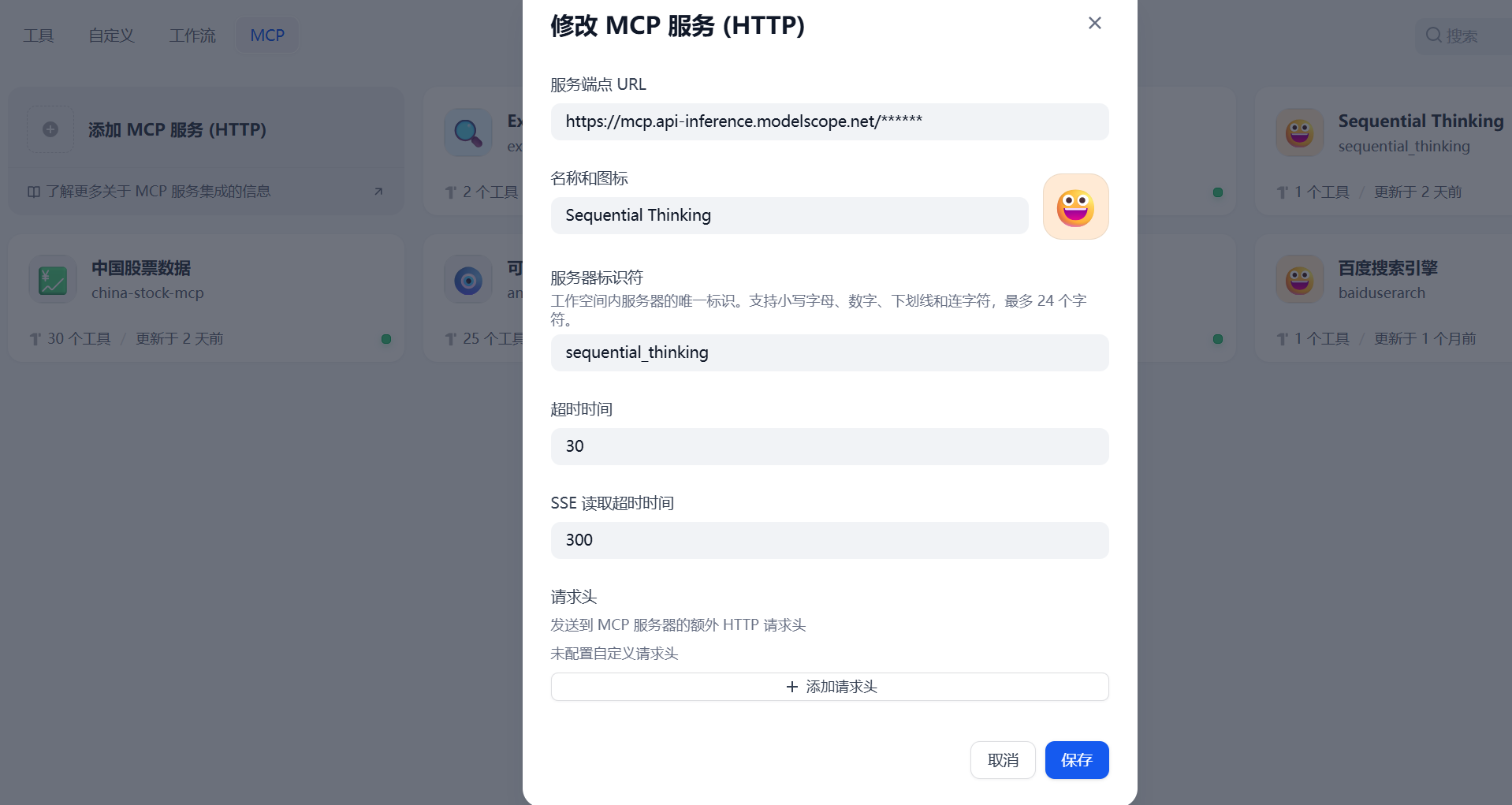
- Configure MCP Tools
Configure common MCP tools in Dify.
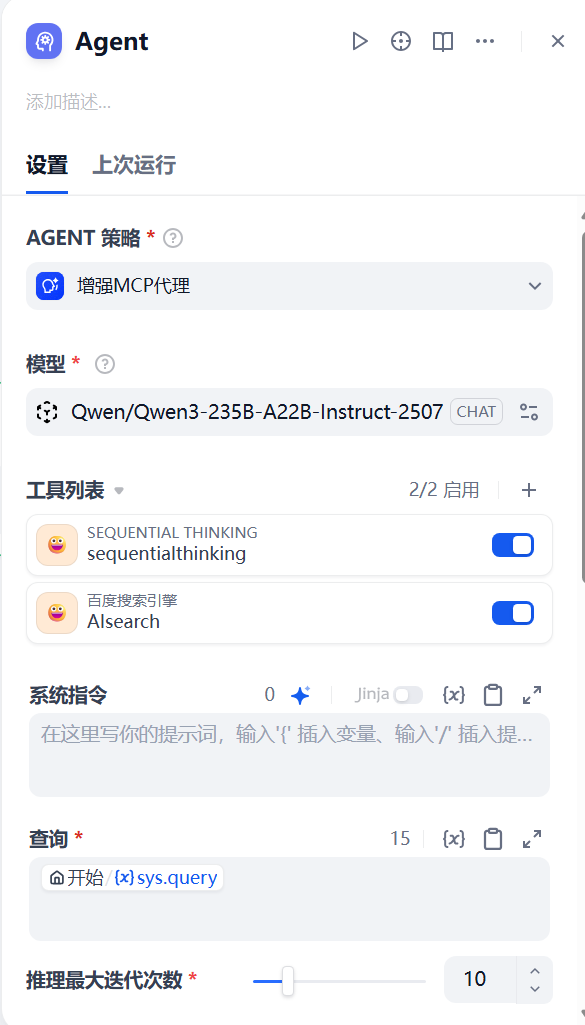
- Configure Plugin
Select "Enhanced MCP Agent" as the AGENT strategy.
Installation & Deployment
To get started with the Enhanced MCP Agent Strategy Plugin:
Install Plugin
Manual Installation to Dify
-
When installing manually: How to Handle Errors When Installing Plugins?
Error:
To resolve this, add to the end of your configuration file.
Adding this field will allow the Dify platform to install all plugins not listed (reviewed) on the Dify Marketplace, which may pose security risks. -
How to Install Offline Version
A script tool to download Dify plugin packages from the Dify Marketplace and GitHub, and repackage them into a "true" offline package (including dependencies, no internet connection required).
https://github.com/xinkuang/dify-plugins/tree/main/ssf
Version Information
- Current Version: v1.0.0
- Author: ssf
- Type: agent-strategy
- Dify Compatibility: , recommended or higher
- Dify Plugin: